> ## Documentation Index
> Fetch the complete documentation index at: https://platform.kimi.com/docs/llms.txt
> Use this file to discover all available pages before exploring further.
# 在 Claude Code 中使用 Kimi
> [Claude Code](https://claude.com/product/claude-code) 是 Anthropic 提供的编程 Agent 产品,界面、配置项和支持能力可能随 Claude Code 版本变化。本文以 Kimi API 的官方调用方式为基础,说明一种通用接入方案:通过环境变量将 Claude Code 的模型请求转发到 Kimi API。
## 安装 Claude Code
若您已安装好 Claude Code,可以跳过这一步。
### MacOS 和 Linux
```shell theme={null}
# MacOS 和 Linux 上安装 nodejs
curl -fsSL https://fnm.vercel.app/install | bash
# 新开一个 terminal,让 fnm 生效
fnm install 24.3.0
fnm default 24.3.0
fnm use 24.3.0
# 安装 claude-code
npm install -g @anthropic-ai/claude-code --registry=https://registry.npmmirror.com
# 初始化配置
node --eval "
const fs = require('fs');
const path = require('path');
const os = require('os');
const homeDir = os.homedir();
const filePath = path.join(homeDir, '.claude.json');
if (fs.existsSync(filePath)) {
const content = JSON.parse(fs.readFileSync(filePath, 'utf-8'));
fs.writeFileSync(filePath, JSON.stringify({ ...content, hasCompletedOnboarding: true }, null, 2), 'utf-8');
} else {
fs.writeFileSync(filePath, JSON.stringify({ hasCompletedOnboarding: true }, null, 2), 'utf-8');
}"
```
### Windows
```powershell theme={null}
# 打开 Windows 终端中的 PowerShell 终端
# Windows 上安装 nodejs
# 右键按 Windows 按钮,点击「终端」
# 然后依次执行下面的命令
winget install OpenJS.NodeJS
Set-ExecutionPolicy -Scope CurrentUser RemoteSigned
# 然后关闭终端窗口,新开一个终端窗口
# 安装 claude-code
npm install -g @anthropic-ai/claude-code --registry=https://registry.npmmirror.com
# 初始化配置
node --eval "
const fs = require('fs');
const path = require('path');
const os = require('os');
const homeDir = os.homedir();
const filePath = path.join(homeDir, '.claude.json');
if (fs.existsSync(filePath)) {
const content = JSON.parse(fs.readFileSync(filePath, 'utf-8'));
fs.writeFileSync(filePath, JSON.stringify({ ...content, hasCompletedOnboarding: true }, null, 2), 'utf-8');
} else {
fs.writeFileSync(filePath, JSON.stringify({ hasCompletedOnboarding: true }, null, 2), 'utf-8');
}"
```
## 配置环境变量
完成 Claude Code 安装后,请按照以下方式设置环境变量,并启动 Claude。
> **获取 API Key**:请访问 [Kimi 开放平台](https://platform.kimi.com/console/api-keys) 创建 API Key,选择 default 默认项目。
### MacOS 和 Linux
```shell theme={null}
export ANTHROPIC_BASE_URL=https://api.moonshot.cn/anthropic
export ANTHROPIC_AUTH_TOKEN=${YOUR_MOONSHOT_API_KEY}
export ANTHROPIC_MODEL=kimi-k2.7-code
export ANTHROPIC_DEFAULT_OPUS_MODEL=kimi-k2.7-code
export ANTHROPIC_DEFAULT_SONNET_MODEL=kimi-k2.7-code
export ANTHROPIC_DEFAULT_HAIKU_MODEL=kimi-k2.7-code
export CLAUDE_CODE_SUBAGENT_MODEL=kimi-k2.7-code
export ENABLE_TOOL_SEARCH=false
export CLAUDE_CODE_AUTO_COMPACT_WINDOW=262144
claude
```
### Windows
```powershell theme={null}
$env:ANTHROPIC_BASE_URL="https://api.moonshot.cn/anthropic";
$env:ANTHROPIC_AUTH_TOKEN="YOUR_MOONSHOT_API_KEY"
$env:ANTHROPIC_MODEL="kimi-k2.7-code"
$env:ANTHROPIC_DEFAULT_OPUS_MODEL="kimi-k2.7-code"
$env:ANTHROPIC_DEFAULT_SONNET_MODEL="kimi-k2.7-code"
$env:ANTHROPIC_DEFAULT_HAIKU_MODEL="kimi-k2.7-code"
$env:CLAUDE_CODE_SUBAGENT_MODEL="kimi-k2.7-code"
$env:ENABLE_TOOL_SEARCH="false"
$env:CLAUDE_CODE_AUTO_COMPACT_WINDOW="262144"
claude
```
## 确认环境变量是否生效
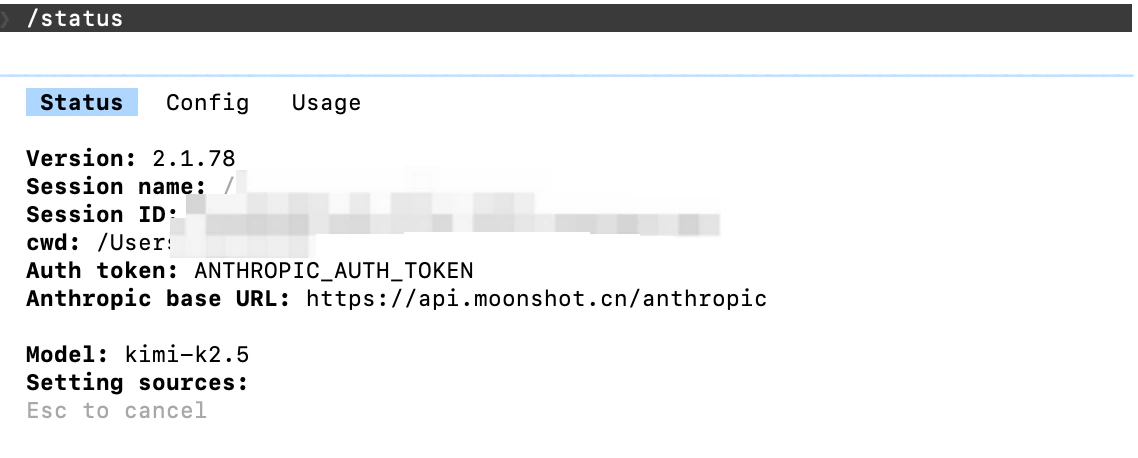
在 Claude Code 中输入 `/status` 确认模型状态:
 ## 体验 Thinking 能力
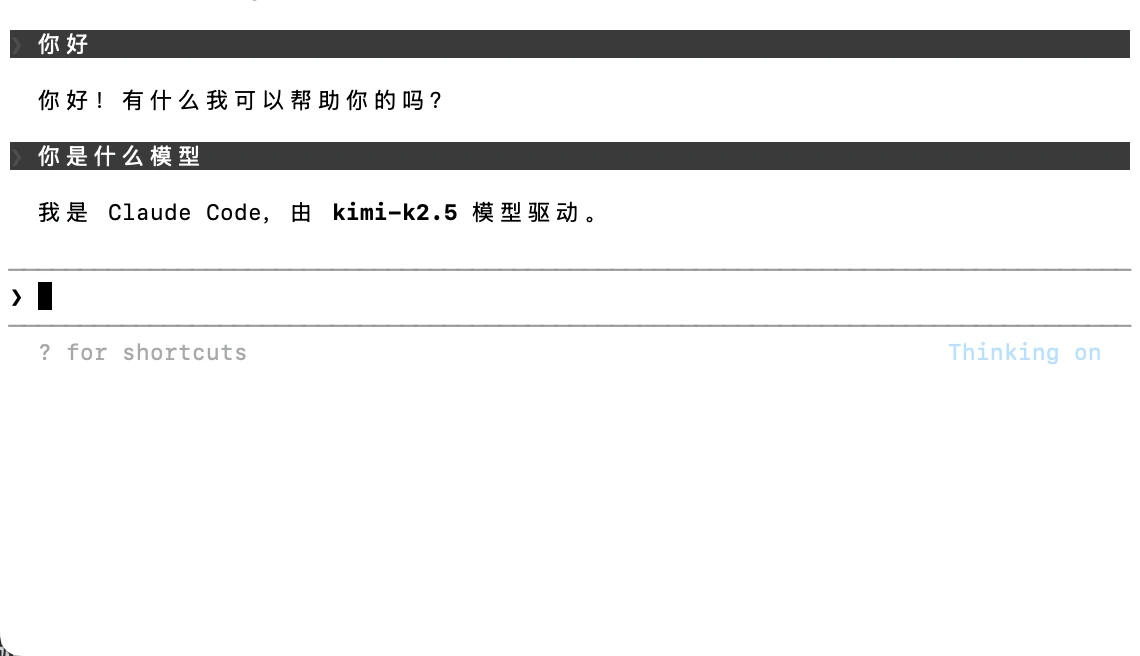
请在配置模型后,进入 Claude Code 页面点击 `Tab` 按钮切换,切换成功可看到 "Thinking on" 的标识。
## 体验 Thinking 能力
请在配置模型后,进入 Claude Code 页面点击 `Tab` 按钮切换,切换成功可看到 "Thinking on" 的标识。
 接下来就可以正常使用 Claude Code 进行开发了!