> ## Documentation Index
> Fetch the complete documentation index at: https://platform.kimi.com/docs/llms.txt
> Use this file to discover all available pages before exploring further.
# Kimi K2.7 Code
## Kimi K2.7 Code 模型介绍
Kimi K2.7 Code 是 Kimi 的 Coding 模型,在长上下文中更可靠地遵循指令,能以更高的成功率完成编程任务,同时支持文本、图片与视频输入,思考模式,对话与 Agent 任务。
同时提供了 Kimi K2.7 Code 高速版(kimi-k2.7-code-highspeed),与 Kimi K2.7 Code 是同一个模型,但输出速度约为普通版的 5-6 倍,常规编程场景下(取输入长度中位数)输出速度约 180 Token/s,短上下文场景可达 260 Token/s ,支持 256K 上下文窗口,带来更极致的编程体验。(目前资源有限,高速版模型体验可能偶有波动,我们正在逐步增量中~)
### 长程编码能力再次突破
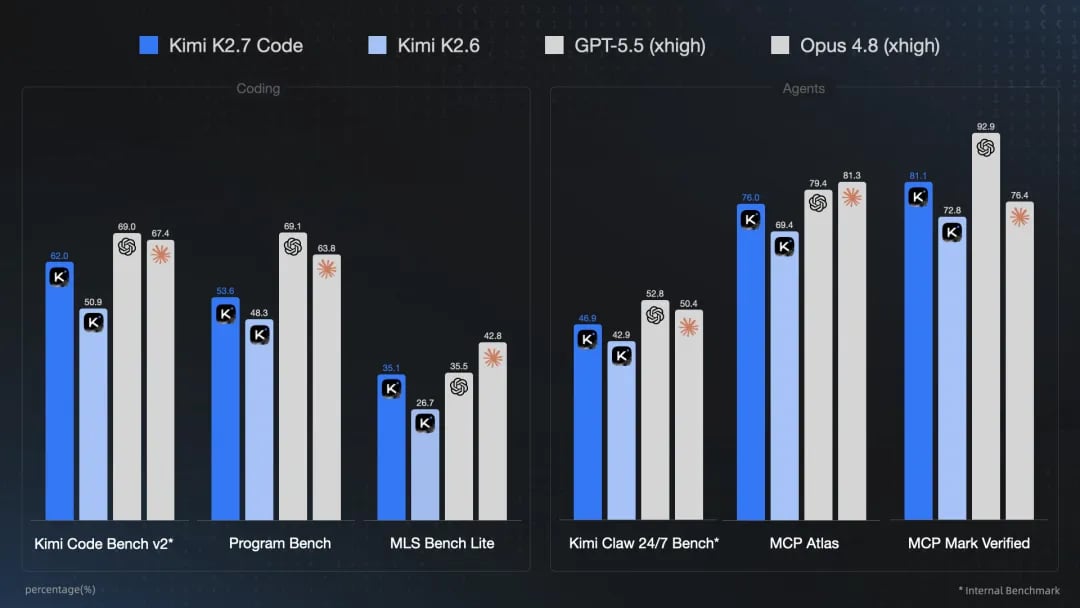
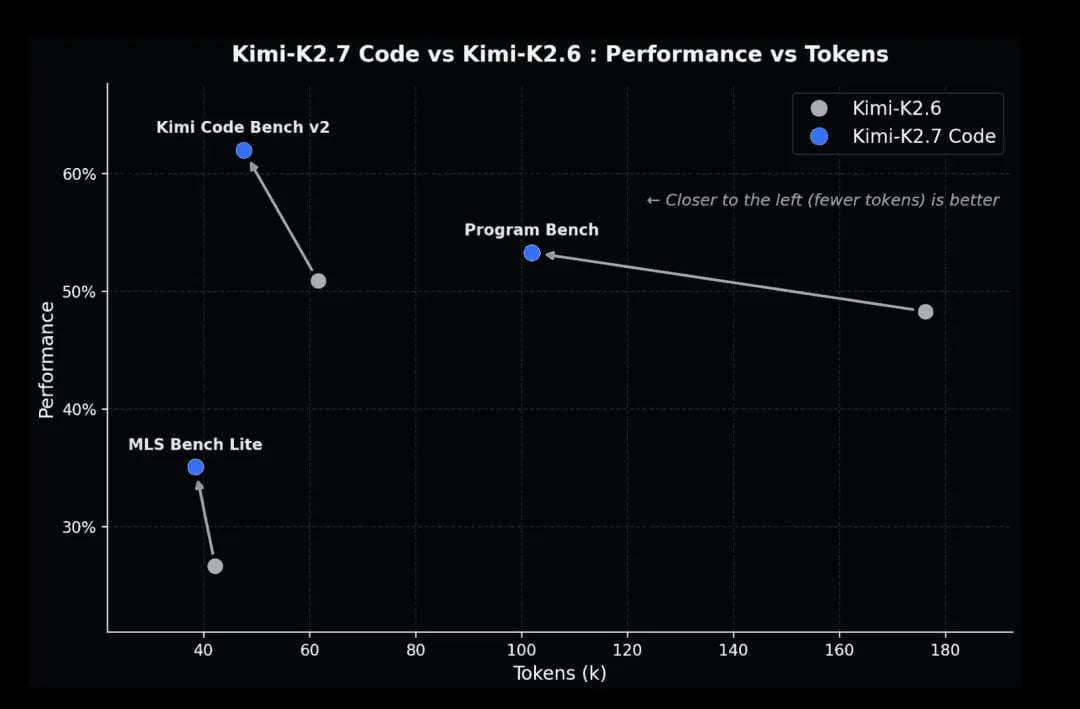
在评估代码能力的基准测试中,K2.7 Code 相比 K2.6 性能显著提升:Kimi Code Bench v2 提升 21.8%、Program-Bench 提升 11%、MLS Bench Lite 提升 31.5%。
 ### Agentic 能力的提升
在评估 Agent 自主化执行能力的 Kimi Claw 24/7 Bench、MCP Atlas 和 MCP Mark Verified 基准测试中,性能提升 10% 左右。
### Agentic 能力的提升
在评估 Agent 自主化执行能力的 Kimi Claw 24/7 Bench、MCP Atlas 和 MCP Mark Verified 基准测试中,性能提升 10% 左右。
 ### 超长上下文支持
* `kimi-k2.7-code`、`kimi-k2.7-code-highspeed`、`kimi-k2.6`、`kimi-k2.5` 模型均提供 256K 上下文窗口
### 长思考能力
* Kimi K2.7 Code 仍然具备超强的思考能力,支持多步工具调用和推理,擅长解决复杂问题,如复杂的逻辑推理、数学问题、代码编写等。Kimi K2.7 Code 不支持非思考模式。
## 立即开始
* [立即体验](https://platform.kimi.com/playground) :在开发工作台,快速通过交互式操作测试模型在业务场景上的效果
* [申请 API Key](https://platform.kimi.com/console/api-keys) :立即通过 API 调用测试
## 调用示例
以下是完整的调用示例,帮助您快速上手 Kimi K2.7 Code 多模态模型。
### 安装 OpenAI SDK
Kimi API 完全兼容 OpenAI 的 API 格式,你可以通过如下方式来安装 OpenAI SDK:
```bash theme={null}
pip install --upgrade 'openai>=1.0'
```
### 验证安装结果
```bash theme={null}
python -c 'import openai; print("version =",openai.__version__)'
# 输出可能是 version = 1.10.0,表示 OpenAI SDK 已经安装成功,当前 python 实际使用了 openai 的 v1.10.0 的库
```
### 多模态工具能力示例
Kimi K2.7 Code 模型综合了多种能力。以下是一个展示 K2.7 Code 视觉理解+工具调用能力的示例。
首先将这个示例视频下载到本地,比如 `/path/to/test_video.mp4`
然后运行以下代码
```python theme={null}
import base64
import json
import os
import subprocess
import tempfile
from pathlib import Path
from openai import OpenAI
tools = [{
"type": "function",
"function": {
"name": "watch_video_clip",
"description": "Watch a video file or a sub-clip of it. If start_time and end_time are not provided, the entire video will be returned.",
"parameters": {
"type": "object",
"properties": {
"path": {
"type": "string",
"description": "The path to the video file to watch"
},
"start_time": {
"type": "number",
"description": "The start time of the clip in seconds (optional, defaults to 0)"
},
"end_time": {
"type": "number",
"description": "The end time of the clip in seconds (optional, defaults to end of video)"
}
},
"required": ["path"]
}
}
}]
def watch_video_clip(path: str, start_time: float | None = None, end_time: float | None = None) -> list[dict]:
"""
Watch a video file or a sub-clip of it.
Args:
path: The path to the video file to watch
start_time: The start time in seconds (optional, defaults to 0)
end_time: The end time in seconds (optional, defaults to end of video)
Returns:
A list of content blocks in MultiModal Tool API format
"""
video_path = Path(path)
if not video_path.exists():
raise FileNotFoundError(f"Video file not found: {path}")
# Get video duration if needed
if start_time is None and end_time is None:
# Return entire video
with open(path, "rb") as f:
video_base64 = base64.b64encode(f.read()).decode("utf-8")
return [
{"type": "video_url", "video_url": {"url": f"data:video/mp4;base64,{video_base64}"}},
{"type": "text", "text": f"Full video: {video_path.name}"}
]
# Get video duration for defaults
probe = subprocess.run(
["ffprobe", "-v", "quiet", "-print_format", "json", "-show_format", path],
capture_output=True, text=True
)
duration = float(json.loads(probe.stdout)["format"]["duration"])
start_time = start_time or 0
end_time = end_time or duration
clip_duration = end_time - start_time
# Extract clip
with tempfile.NamedTemporaryFile(suffix=".mp4", delete=False) as tmp:
tmp_path = tmp.name
try:
subprocess.run([
"ffmpeg", "-y", "-ss", str(start_time), "-i", path,
"-t", str(clip_duration), "-c:v", "libx264", "-c:a", "aac",
"-preset", "fast", "-crf", "23", "-movflags", "+faststart",
"-loglevel", "error", tmp_path
], check=True)
with open(tmp_path, "rb") as f:
video_base64 = base64.b64encode(f.read()).decode("utf-8")
return [
{"type": "video_url", "video_url": {"url": f"data:video/mp4;base64,{video_base64}"}},
{"type": "text", "text": f"Clip from {video_path.name}: {start_time}s - {end_time}s"}
]
finally:
if os.path.exists(tmp_path):
os.unlink(tmp_path)
client = OpenAI(
api_key=os.environ.get("MOONSHOT_API_KEY"),
base_url="https://api.moonshot.cn/v1"
)
def agent_loop(user_message: str):
"""Simple agent loop with multimodal tool support."""
messages = [
{"role": "system", "content": "You are a video analysis assistant. Use watch_video_clip to examine specific portions of videos."},
{"role": "user", "content": user_message}
]
while True:
response = client.chat.completions.create(
model="kimi-k2.7-code",
messages=messages,
tools=tools,
tool_choice="auto"
)
message = response.choices[0].message
messages.append(message.model_dump())
# No tool calls = done
if not message.tool_calls:
return message.content
# Execute tool calls
for tool_call in message.tool_calls:
if tool_call.function.name == "watch_video_clip":
args = json.loads(tool_call.function.arguments)
result = watch_video_clip(
path=args["path"],
start_time=args.get("start_time"),
end_time=args.get("end_time")
)
# Multimodal tool result
messages.append({
"role": "tool",
"tool_call_id": tool_call.id,
"content": result
})
# Usage
answer = agent_loop("分析 /path/to/test_video.mp4 这个视频的 8-13 秒发生了什么")
print(answer)
```
## 最佳实践
### 支持的格式
图片支持 png、jpeg、webp、gif;视频支持 mp4、mpeg、mov、avi、x-flv、mpg、webm、wmv、3gpp 格式。
### Tokens 计算及费用
图片与视频进行动态token计算,可以通过 [计算token接口](/docs/api/estimate) ,在开始理解前获取包含图片或视频的请求的 token 消耗。
一般说来,图片分辨率越高,消耗的token越多;视频由若干张关键帧组成,关键帧的数量越多,分辨率越高,则 token 消耗越多。
Vision 模型在计费方式上与 `moonshot-v1` 系列模型保持一致,根据模型推理的总 Tokens 计费,详情请查看:
关于 token 价格,详见 [模型推理价格说明](/docs/pricing/chat-k27-code) 。
### 分辨率说明
我们推荐图片分辨率不超过4k (4096\*2160),视频分辨率不超过 1080p (1920\*1080),再高的分辨率只会增加处理时间,也不会对模型理解的效果有提升。
### 上传文件还是base64
由于我们对请求体的整体大小有限制,所以对于非常大的视频,必须使用上传文件的方式使用视觉理解功能。对于需要多次引用的图片或视频,我们推荐使用文件上传的方式使用视觉理解功能。关于上传文件的限制,请参阅 [文件上传](/docs/api/files-upload) 文档。
图片数量限制:Vision 模型没有图片数量限制,但请确保请求的 Body 大小不超过 100M
URL 格式的图片:不支持,目前仅支持使用 base64 编码的图片内容
## 参数变动说明
在 [对话补全](/docs/api/chat) 文档中有一系列参数,但对于 K2.7 Code/K2.6/K2.5系列模型,其行为会有所不同。
**我们建议用户不要手动设置这些字段,而是使用默认值**
参数变动列举如下:
| 字段 | 是否必须 | 说明 | 类型 | 取值 |
| ------------------ | -------- | --------------------- | ------ | ----------------------------------------------------- |
| max\_tokens | optional | 聊天完成时生成的最大 token 数。 | int | 默认值为32k,即32768 |
| thinking | optional | **新增** 该参数控制模型是否启用思考。 | object | 默认值为`{"type": "enabled"}`. kimi-k2.7-code 模型关闭思考模式会报错 |
| temperature | optional | 使用什么采样温度。 | float | k2.7-code 模型将使用确定值 1.0, 若指定其他值,将会报错。 |
| top\_p | optional | 采样方法。 | float | k2.7-code/k2.6/k2.5 系列模型将使用确定值 0.95。若指定其他值,将会报错。 |
| n | optional | 为每条输入消息生成多少个结果。 | int | k2.7-code/k2.6/k2.5 系列模型将使用确定值 1。若指定其他值,将会报错。 |
| presence\_penalty | optional | 存在惩罚。 | float | k2.7-code/k2.6/k2.5 系列模型将使用固定值 0.0。 若指定其他值,将会报错。 |
| frequency\_penalty | optional | 频率惩罚。 | float | k2.7-code/k2.6/k2.5 系列模型将使用确定值 0.0。若指定其他值,将会报错。 |
## Tool Use 参数兼容性
当使用工具时,请注意,为了确保模型的性能,会有以下约束:
* 为了避免思考内容与指定的 `tool_choice` 冲突,`tool_choice` 只能使用"auto"和"none"(默认值为"auto"),取任何其他值将会报错;
* 在多步工具调用过程中,您必须在将本轮会话中工具调用时 assistant message 里的 `reasoning_content` 保留在上下文当中,否则会报错;
更多参数配置信息,请查看 [使用指南 - 模型参数](/docs/guide/use-thinking-models) 。
## 模型价格
关于 token 价格,详见 [产品定价](/docs/pricing/chat-k27-code) 。
### 超长上下文支持
* `kimi-k2.7-code`、`kimi-k2.7-code-highspeed`、`kimi-k2.6`、`kimi-k2.5` 模型均提供 256K 上下文窗口
### 长思考能力
* Kimi K2.7 Code 仍然具备超强的思考能力,支持多步工具调用和推理,擅长解决复杂问题,如复杂的逻辑推理、数学问题、代码编写等。Kimi K2.7 Code 不支持非思考模式。
## 立即开始
* [立即体验](https://platform.kimi.com/playground) :在开发工作台,快速通过交互式操作测试模型在业务场景上的效果
* [申请 API Key](https://platform.kimi.com/console/api-keys) :立即通过 API 调用测试
## 调用示例
以下是完整的调用示例,帮助您快速上手 Kimi K2.7 Code 多模态模型。
### 安装 OpenAI SDK
Kimi API 完全兼容 OpenAI 的 API 格式,你可以通过如下方式来安装 OpenAI SDK:
```bash theme={null}
pip install --upgrade 'openai>=1.0'
```
### 验证安装结果
```bash theme={null}
python -c 'import openai; print("version =",openai.__version__)'
# 输出可能是 version = 1.10.0,表示 OpenAI SDK 已经安装成功,当前 python 实际使用了 openai 的 v1.10.0 的库
```
### 多模态工具能力示例
Kimi K2.7 Code 模型综合了多种能力。以下是一个展示 K2.7 Code 视觉理解+工具调用能力的示例。
首先将这个示例视频下载到本地,比如 `/path/to/test_video.mp4`
然后运行以下代码
```python theme={null}
import base64
import json
import os
import subprocess
import tempfile
from pathlib import Path
from openai import OpenAI
tools = [{
"type": "function",
"function": {
"name": "watch_video_clip",
"description": "Watch a video file or a sub-clip of it. If start_time and end_time are not provided, the entire video will be returned.",
"parameters": {
"type": "object",
"properties": {
"path": {
"type": "string",
"description": "The path to the video file to watch"
},
"start_time": {
"type": "number",
"description": "The start time of the clip in seconds (optional, defaults to 0)"
},
"end_time": {
"type": "number",
"description": "The end time of the clip in seconds (optional, defaults to end of video)"
}
},
"required": ["path"]
}
}
}]
def watch_video_clip(path: str, start_time: float | None = None, end_time: float | None = None) -> list[dict]:
"""
Watch a video file or a sub-clip of it.
Args:
path: The path to the video file to watch
start_time: The start time in seconds (optional, defaults to 0)
end_time: The end time in seconds (optional, defaults to end of video)
Returns:
A list of content blocks in MultiModal Tool API format
"""
video_path = Path(path)
if not video_path.exists():
raise FileNotFoundError(f"Video file not found: {path}")
# Get video duration if needed
if start_time is None and end_time is None:
# Return entire video
with open(path, "rb") as f:
video_base64 = base64.b64encode(f.read()).decode("utf-8")
return [
{"type": "video_url", "video_url": {"url": f"data:video/mp4;base64,{video_base64}"}},
{"type": "text", "text": f"Full video: {video_path.name}"}
]
# Get video duration for defaults
probe = subprocess.run(
["ffprobe", "-v", "quiet", "-print_format", "json", "-show_format", path],
capture_output=True, text=True
)
duration = float(json.loads(probe.stdout)["format"]["duration"])
start_time = start_time or 0
end_time = end_time or duration
clip_duration = end_time - start_time
# Extract clip
with tempfile.NamedTemporaryFile(suffix=".mp4", delete=False) as tmp:
tmp_path = tmp.name
try:
subprocess.run([
"ffmpeg", "-y", "-ss", str(start_time), "-i", path,
"-t", str(clip_duration), "-c:v", "libx264", "-c:a", "aac",
"-preset", "fast", "-crf", "23", "-movflags", "+faststart",
"-loglevel", "error", tmp_path
], check=True)
with open(tmp_path, "rb") as f:
video_base64 = base64.b64encode(f.read()).decode("utf-8")
return [
{"type": "video_url", "video_url": {"url": f"data:video/mp4;base64,{video_base64}"}},
{"type": "text", "text": f"Clip from {video_path.name}: {start_time}s - {end_time}s"}
]
finally:
if os.path.exists(tmp_path):
os.unlink(tmp_path)
client = OpenAI(
api_key=os.environ.get("MOONSHOT_API_KEY"),
base_url="https://api.moonshot.cn/v1"
)
def agent_loop(user_message: str):
"""Simple agent loop with multimodal tool support."""
messages = [
{"role": "system", "content": "You are a video analysis assistant. Use watch_video_clip to examine specific portions of videos."},
{"role": "user", "content": user_message}
]
while True:
response = client.chat.completions.create(
model="kimi-k2.7-code",
messages=messages,
tools=tools,
tool_choice="auto"
)
message = response.choices[0].message
messages.append(message.model_dump())
# No tool calls = done
if not message.tool_calls:
return message.content
# Execute tool calls
for tool_call in message.tool_calls:
if tool_call.function.name == "watch_video_clip":
args = json.loads(tool_call.function.arguments)
result = watch_video_clip(
path=args["path"],
start_time=args.get("start_time"),
end_time=args.get("end_time")
)
# Multimodal tool result
messages.append({
"role": "tool",
"tool_call_id": tool_call.id,
"content": result
})
# Usage
answer = agent_loop("分析 /path/to/test_video.mp4 这个视频的 8-13 秒发生了什么")
print(answer)
```
## 最佳实践
### 支持的格式
图片支持 png、jpeg、webp、gif;视频支持 mp4、mpeg、mov、avi、x-flv、mpg、webm、wmv、3gpp 格式。
### Tokens 计算及费用
图片与视频进行动态token计算,可以通过 [计算token接口](/docs/api/estimate) ,在开始理解前获取包含图片或视频的请求的 token 消耗。
一般说来,图片分辨率越高,消耗的token越多;视频由若干张关键帧组成,关键帧的数量越多,分辨率越高,则 token 消耗越多。
Vision 模型在计费方式上与 `moonshot-v1` 系列模型保持一致,根据模型推理的总 Tokens 计费,详情请查看:
关于 token 价格,详见 [模型推理价格说明](/docs/pricing/chat-k27-code) 。
### 分辨率说明
我们推荐图片分辨率不超过4k (4096\*2160),视频分辨率不超过 1080p (1920\*1080),再高的分辨率只会增加处理时间,也不会对模型理解的效果有提升。
### 上传文件还是base64
由于我们对请求体的整体大小有限制,所以对于非常大的视频,必须使用上传文件的方式使用视觉理解功能。对于需要多次引用的图片或视频,我们推荐使用文件上传的方式使用视觉理解功能。关于上传文件的限制,请参阅 [文件上传](/docs/api/files-upload) 文档。
图片数量限制:Vision 模型没有图片数量限制,但请确保请求的 Body 大小不超过 100M
URL 格式的图片:不支持,目前仅支持使用 base64 编码的图片内容
## 参数变动说明
在 [对话补全](/docs/api/chat) 文档中有一系列参数,但对于 K2.7 Code/K2.6/K2.5系列模型,其行为会有所不同。
**我们建议用户不要手动设置这些字段,而是使用默认值**
参数变动列举如下:
| 字段 | 是否必须 | 说明 | 类型 | 取值 |
| ------------------ | -------- | --------------------- | ------ | ----------------------------------------------------- |
| max\_tokens | optional | 聊天完成时生成的最大 token 数。 | int | 默认值为32k,即32768 |
| thinking | optional | **新增** 该参数控制模型是否启用思考。 | object | 默认值为`{"type": "enabled"}`. kimi-k2.7-code 模型关闭思考模式会报错 |
| temperature | optional | 使用什么采样温度。 | float | k2.7-code 模型将使用确定值 1.0, 若指定其他值,将会报错。 |
| top\_p | optional | 采样方法。 | float | k2.7-code/k2.6/k2.5 系列模型将使用确定值 0.95。若指定其他值,将会报错。 |
| n | optional | 为每条输入消息生成多少个结果。 | int | k2.7-code/k2.6/k2.5 系列模型将使用确定值 1。若指定其他值,将会报错。 |
| presence\_penalty | optional | 存在惩罚。 | float | k2.7-code/k2.6/k2.5 系列模型将使用固定值 0.0。 若指定其他值,将会报错。 |
| frequency\_penalty | optional | 频率惩罚。 | float | k2.7-code/k2.6/k2.5 系列模型将使用确定值 0.0。若指定其他值,将会报错。 |
## Tool Use 参数兼容性
当使用工具时,请注意,为了确保模型的性能,会有以下约束:
* 为了避免思考内容与指定的 `tool_choice` 冲突,`tool_choice` 只能使用"auto"和"none"(默认值为"auto"),取任何其他值将会报错;
* 在多步工具调用过程中,您必须在将本轮会话中工具调用时 assistant message 里的 `reasoning_content` 保留在上下文当中,否则会报错;
更多参数配置信息,请查看 [使用指南 - 模型参数](/docs/guide/use-thinking-models) 。
## 模型价格
关于 token 价格,详见 [产品定价](/docs/pricing/chat-k27-code) 。