> ## Documentation Index
> Fetch the complete documentation index at: https://platform.kimi.com/docs/llms.txt
> Use this file to discover all available pages before exploring further.
# 动态加载工具
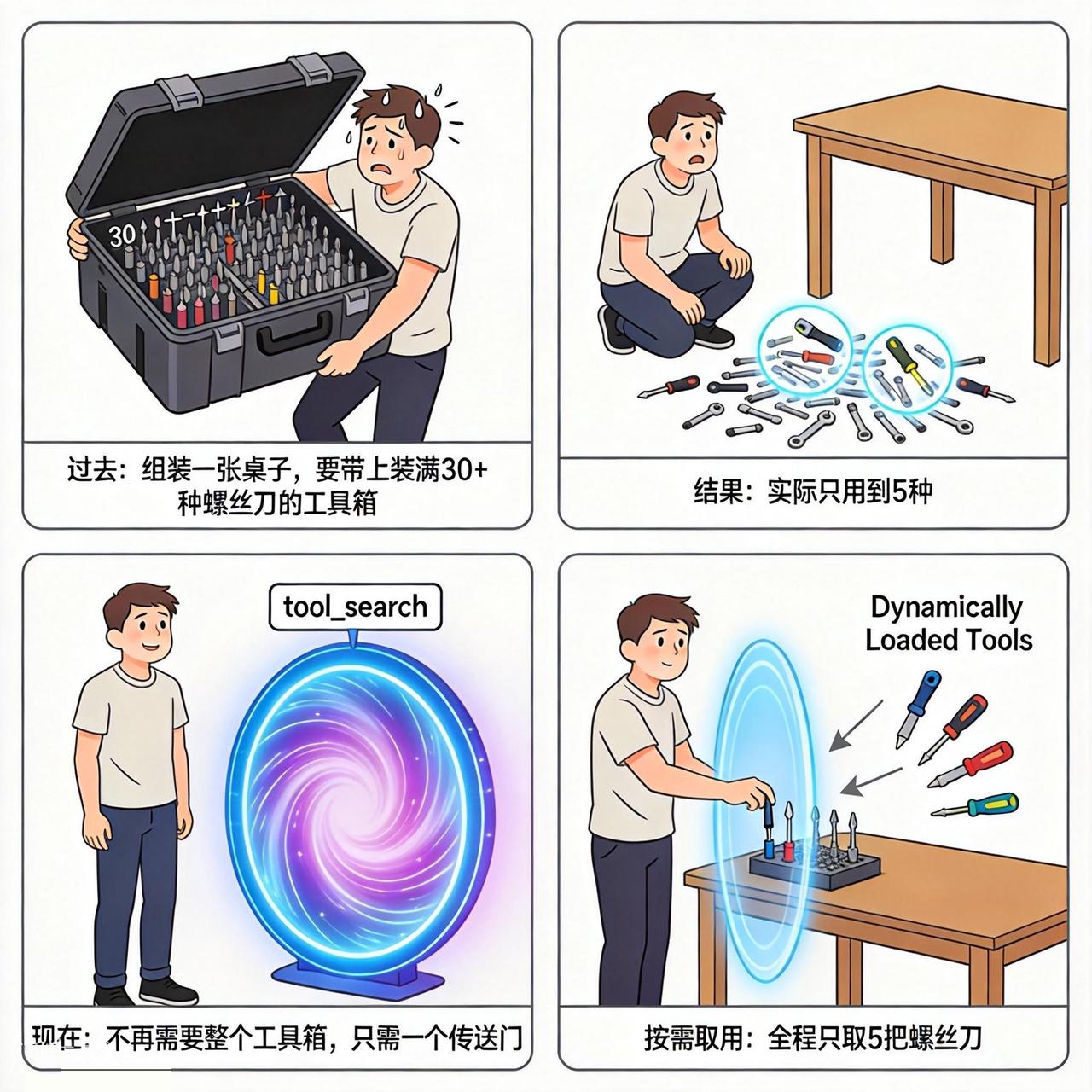
当你的应用需要挂载大量工具时,如果把所有工具的声明一次性放进请求顶层的 `tools` 字段,会遇到 **工具定义膨胀(Tool Definition Bloat)** 问题:每个请求都要携带全部工具的描述和参数 schema,token 消耗高;候选工具越多,模型也越容易选错工具、构造出错误的调用参数。
动态加载工具(Dynamically Loaded Tools)允许你在对话过程中 **按需注入工具**:先只挂载少量核心工具,当对话进展到需要某个工具时,再把它动态插入 `messages` 中,从而同时降低 token 消耗、提升工具选择的准确性。关于这一设计背后的思路(Lazy-Load、工具目录)与组合实践,见 [Kimi K3 API 工具调用最佳实践](/guide/kimi-k3-tool-calling-best-practice)。
 ## 在 messages 中注入工具声明
在 `messages` 中插入一条 `role` 为 `system` 的消息,并通过该消息的 `tools` 字段声明要加载的工具。声明格式与请求顶层 `tools` 字段的格式完全一致,且需要提供工具的 **完整信息**(`name`、`description`、`parameters`):
```json theme={null}
{
"messages": [
{
"role": "system",
"content": "You are a helpful assistant."
},
{
"role": "user",
"content": "Calculate fuel consumption."
},
{
"role": "system",
"tools": [
{
"type": "function",
"function": {
"name": "Calculator",
"description": "计算器,只支持单个算术表达式的求值",
"parameters": {
"type": "object",
"properties": {
"expr": {
"type": "string",
"description": "算术表达式,支持四则运算、指数运算、对数函数、三角函数,使用 javascript 语法"
}
},
"required": ["expr"]
}
}
}
]
}
]
}
```
几点说明:
* 携带 `tools` 的 `system` 消息与普通的 input messages **地位相同**:它出现在 `messages` 列表的哪个位置,工具就从哪个位置开始对模型可见;
* 动态加载的工具与请求顶层 `tools` 字段声明的全局工具 **并存**,模型可以同时看到两类工具;
* 动态注入的工具声明必须是 **完整** 的工具定义,不能只传工具名或引用全局已声明的工具。
```bash theme={null}
$ curl https://api.moonshot.cn/v1/chat/completions \
-H "Content-Type: application/json" \
-H "Authorization: Bearer $MOONSHOT_API_KEY" \
-d '{
"model": "kimi-k3",
"messages": [
{
"role": "system",
"content": "You are a helpful assistant."
},
{
"role": "user",
"content": "帮我计算一下 23 * 47 的结果。"
},
{
"role": "system",
"tools": [
{
"type": "function",
"function": {
"name": "Calculator",
"description": "计算器,只支持单个算术表达式的求值",
"parameters": {
"type": "object",
"properties": {
"expr": {
"type": "string",
"description": "算术表达式,支持四则运算、指数运算、对数函数、三角函数,使用 javascript 语法"
}
},
"required": ["expr"]
}
}
}
]
}
]
}'
```
```python theme={null}
import os
from openai import OpenAI
client = OpenAI(
api_key=os.environ["MOONSHOT_API_KEY"],
base_url="https://api.moonshot.cn/v1",
)
completion = client.chat.completions.create(
model="kimi-k3",
messages=[
{"role": "system", "content": "You are a helpful assistant."},
{"role": "user", "content": "帮我计算一下 23 * 47 的结果。"},
# 动态加载工具:在对话中插入一条携带 tools 的 system 消息
{
"role": "system",
"tools": [
{
"type": "function",
"function": {
"name": "Calculator",
"description": "计算器,只支持单个算术表达式的求值",
"parameters": {
"type": "object",
"properties": {
"expr": {
"type": "string",
"description": "算术表达式,支持四则运算、指数运算、对数函数、三角函数,使用 javascript 语法",
}
},
"required": ["expr"],
},
},
}
],
},
],
)
print(completion.choices[0].message.tool_calls)
```
## 用动态加载实现 Tool Search
API 层面没有专门的 tool search 接口。如果你的工具数量很多,可以组合「自定义 search 工具 + 动态加载工具」来自行实现 tool search:
1. 在请求顶层 `tools` 中只声明一个 `search_tools` 工具,由你的后端实现,按关键词返回匹配的工具名称和简介;
2. 在 system prompt 中声明可被搜索的关键词(例如工具目录、领域标签),引导模型在需要工具时先调用 `search_tools`;
3. 根据 `search_tools` 返回的结果,由你的应用把对应工具的 **完整声明** 通过一条携带 `tools` 的 `system` 消息动态插入 `messages`;
4. 模型即可在后续生成中直接调用这些新加载的工具。
这样无论工具总量有多大,每一轮请求中实际存在的工具声明都只有少量几个,上下文窗口和模型的选择压力都可控。
## 注意事项
* 动态工具声明按请求生效,不会被服务端记住。下一轮请求是否继续携带,由接入方自行决定:
* **继续携带**:工具仍然可用,也有利于命中前缀缓存;
* **不再携带**:该工具声明失效;如果工具未在其他位置声明,模型将无法调用这个工具。同时,由于 `messages` 发生变化,变更位置之后的前缀缓存可能无法命中。
* 动态工具声明与全局 `tools` 声明 **格式完全统一**,接入方无需维护两套 schema,迁移成本低;
* 在 `messages` 末尾追加动态工具声明,不会影响已有前缀的缓存。删除或修改之前的工具声明,可能影响变更位置之后的缓存命中。在请求顶层 `tools` 字段声明全局工具同样不影响缓存命中;
* 携带 `tools` 的 `system` 消息同样会占用上下文长度,请只对当前对话真正需要的工具做动态注入;
* 动态加载工具目前仅 `kimi-k3` 支持,在其他模型(如 `kimi-k2.6`)上请求会返回 `tokenization failed` 错误;
* 携带 `tools` 的 `system` 消息不能再携带 `content` 字段,否则请求会以 400 报错(`cannot be used with content`);使用 OpenAI SDK 时可直接在 `messages` 中透传 `tools` 字段,无需 `extra_body`。
## 相关阅读
* [Kimi K3 API 工具调用最佳实践](/guide/kimi-k3-tool-calling-best-practice):动态加载、tool\_choice 与思考力度的组合实践
* [工具调用约束](/guide/use-tool-choice):通过 `tool_choice` 约束模型的工具调用行为
* [使用 Kimi API 完成工具调用](/guide/use-kimi-api-to-complete-tool-calls):工具调用的完整流程与示例
* [模型参数参考](/api/models-overview):各模型对 `tool_choice` 等参数的支持差异
## 在 messages 中注入工具声明
在 `messages` 中插入一条 `role` 为 `system` 的消息,并通过该消息的 `tools` 字段声明要加载的工具。声明格式与请求顶层 `tools` 字段的格式完全一致,且需要提供工具的 **完整信息**(`name`、`description`、`parameters`):
```json theme={null}
{
"messages": [
{
"role": "system",
"content": "You are a helpful assistant."
},
{
"role": "user",
"content": "Calculate fuel consumption."
},
{
"role": "system",
"tools": [
{
"type": "function",
"function": {
"name": "Calculator",
"description": "计算器,只支持单个算术表达式的求值",
"parameters": {
"type": "object",
"properties": {
"expr": {
"type": "string",
"description": "算术表达式,支持四则运算、指数运算、对数函数、三角函数,使用 javascript 语法"
}
},
"required": ["expr"]
}
}
}
]
}
]
}
```
几点说明:
* 携带 `tools` 的 `system` 消息与普通的 input messages **地位相同**:它出现在 `messages` 列表的哪个位置,工具就从哪个位置开始对模型可见;
* 动态加载的工具与请求顶层 `tools` 字段声明的全局工具 **并存**,模型可以同时看到两类工具;
* 动态注入的工具声明必须是 **完整** 的工具定义,不能只传工具名或引用全局已声明的工具。
```bash theme={null}
$ curl https://api.moonshot.cn/v1/chat/completions \
-H "Content-Type: application/json" \
-H "Authorization: Bearer $MOONSHOT_API_KEY" \
-d '{
"model": "kimi-k3",
"messages": [
{
"role": "system",
"content": "You are a helpful assistant."
},
{
"role": "user",
"content": "帮我计算一下 23 * 47 的结果。"
},
{
"role": "system",
"tools": [
{
"type": "function",
"function": {
"name": "Calculator",
"description": "计算器,只支持单个算术表达式的求值",
"parameters": {
"type": "object",
"properties": {
"expr": {
"type": "string",
"description": "算术表达式,支持四则运算、指数运算、对数函数、三角函数,使用 javascript 语法"
}
},
"required": ["expr"]
}
}
}
]
}
]
}'
```
```python theme={null}
import os
from openai import OpenAI
client = OpenAI(
api_key=os.environ["MOONSHOT_API_KEY"],
base_url="https://api.moonshot.cn/v1",
)
completion = client.chat.completions.create(
model="kimi-k3",
messages=[
{"role": "system", "content": "You are a helpful assistant."},
{"role": "user", "content": "帮我计算一下 23 * 47 的结果。"},
# 动态加载工具:在对话中插入一条携带 tools 的 system 消息
{
"role": "system",
"tools": [
{
"type": "function",
"function": {
"name": "Calculator",
"description": "计算器,只支持单个算术表达式的求值",
"parameters": {
"type": "object",
"properties": {
"expr": {
"type": "string",
"description": "算术表达式,支持四则运算、指数运算、对数函数、三角函数,使用 javascript 语法",
}
},
"required": ["expr"],
},
},
}
],
},
],
)
print(completion.choices[0].message.tool_calls)
```
## 用动态加载实现 Tool Search
API 层面没有专门的 tool search 接口。如果你的工具数量很多,可以组合「自定义 search 工具 + 动态加载工具」来自行实现 tool search:
1. 在请求顶层 `tools` 中只声明一个 `search_tools` 工具,由你的后端实现,按关键词返回匹配的工具名称和简介;
2. 在 system prompt 中声明可被搜索的关键词(例如工具目录、领域标签),引导模型在需要工具时先调用 `search_tools`;
3. 根据 `search_tools` 返回的结果,由你的应用把对应工具的 **完整声明** 通过一条携带 `tools` 的 `system` 消息动态插入 `messages`;
4. 模型即可在后续生成中直接调用这些新加载的工具。
这样无论工具总量有多大,每一轮请求中实际存在的工具声明都只有少量几个,上下文窗口和模型的选择压力都可控。
## 注意事项
* 动态工具声明按请求生效,不会被服务端记住。下一轮请求是否继续携带,由接入方自行决定:
* **继续携带**:工具仍然可用,也有利于命中前缀缓存;
* **不再携带**:该工具声明失效;如果工具未在其他位置声明,模型将无法调用这个工具。同时,由于 `messages` 发生变化,变更位置之后的前缀缓存可能无法命中。
* 动态工具声明与全局 `tools` 声明 **格式完全统一**,接入方无需维护两套 schema,迁移成本低;
* 在 `messages` 末尾追加动态工具声明,不会影响已有前缀的缓存。删除或修改之前的工具声明,可能影响变更位置之后的缓存命中。在请求顶层 `tools` 字段声明全局工具同样不影响缓存命中;
* 携带 `tools` 的 `system` 消息同样会占用上下文长度,请只对当前对话真正需要的工具做动态注入;
* 动态加载工具目前仅 `kimi-k3` 支持,在其他模型(如 `kimi-k2.6`)上请求会返回 `tokenization failed` 错误;
* 携带 `tools` 的 `system` 消息不能再携带 `content` 字段,否则请求会以 400 报错(`cannot be used with content`);使用 OpenAI SDK 时可直接在 `messages` 中透传 `tools` 字段,无需 `extra_body`。
## 相关阅读
* [Kimi K3 API 工具调用最佳实践](/guide/kimi-k3-tool-calling-best-practice):动态加载、tool\_choice 与思考力度的组合实践
* [工具调用约束](/guide/use-tool-choice):通过 `tool_choice` 约束模型的工具调用行为
* [使用 Kimi API 完成工具调用](/guide/use-kimi-api-to-complete-tool-calls):工具调用的完整流程与示例
* [模型参数参考](/api/models-overview):各模型对 `tool_choice` 等参数的支持差异