

本文介绍如何在 Claude Code 中接入 Kimi 的 Anthropic 兼容端点(Messages API)。Claude Code 的界面与配置项可能随版本变化,请以实际版本为准。
安装 Claude Code
已安装的用户可跳过。执行以下命令安装:安装 Node.js 与初始化配置
安装 Node.js 与初始化配置
macOS 和 Linux:Windows(PowerShell):安装 Node.js 后,执行一次初始化配置:
非首次安装:注意清理历史配置和环境变量
非首次安装:注意清理历史配置和环境变量
如果您之前通过第三方工具或手动修改过 该脚本仅删除
~/.claude/settings.json,里面残留的旧配置会 覆盖 终端里 export 的同名环境变量,导致新配置不生效或模型请求被静默改写。建议先执行以下脚本清理:env 中的端点、密钥与模型相关变量,不影响 settings.json 中的其他配置(如权限、主题等)。另外,请检查 ~/.zshrc、~/.bashrc 等 shell 配置文件中是否残留旧的 ANTHROPIC_* export(Windows 用户请检查用户环境变量),如有请一并删除,否则同样会干扰新配置。获取 Kimi API Key
访问 Kimi 开放平台 创建 API Key,替换下文中的YOUR_MOONSHOT_API_KEY。
配置环境变量
将以下变量写入~/.claude/settings.json 的 env 字段,保存后重启 Claude Code 即可生效。本示例将 HAIKU 档配置为 kimi-k2.7-code,其余档位均为 kimi-k3[1m]。
settings.json 的 env 会 覆盖 终端里 export 的同名变量;该文件包含明文 API Key,请勿提交到 git 仓库。
配置项说明
Claude Code 内部会按场景使用不同档位的模型(主对话、后台摘要、子 Agent 等),只配置部分变量会让对应场景静默失败:模型与思考行为
三个模型在 Claude Code 中的行为差异:
未开启思考时,
kimi-k2.7-code 的请求会被拒绝并返回 400 invalid thinking: only type=enabled is allowed for this model。
确认配置是否生效
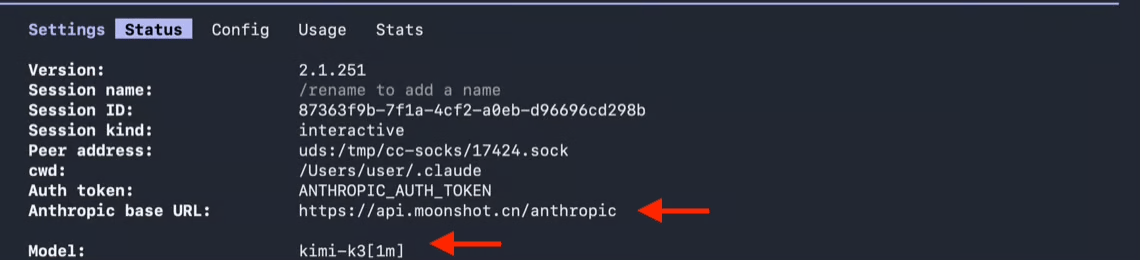
配置完成后,可以先用 curl 验证端点和 API Key 是否可用:/status 确认配置状态:
- Base URL 应显示为
https://api.moonshot.cn/anthropic - Model 应显示为
kimi-k3[1m]
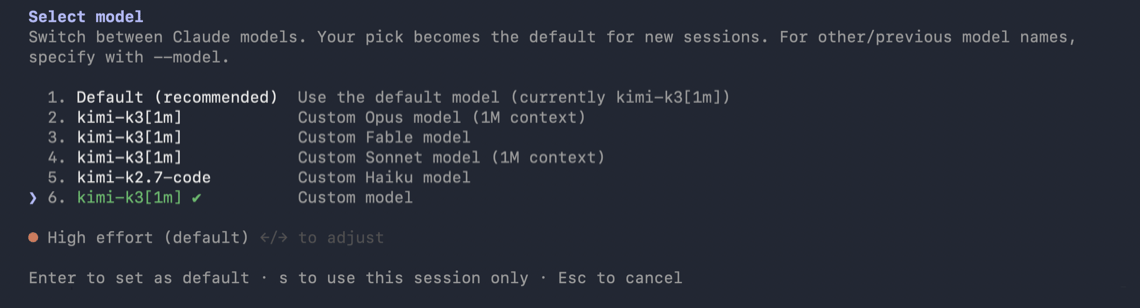
/model 菜单会显示已配置的模型。
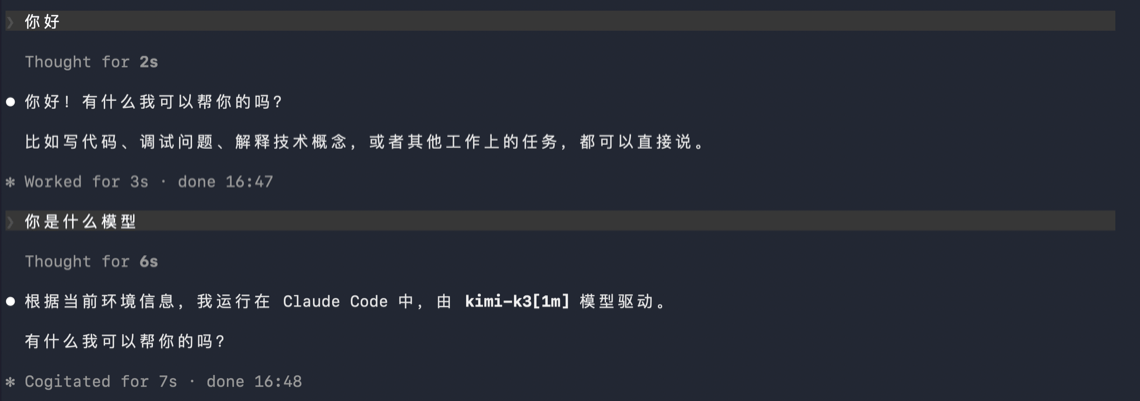
你好),能正常收到回复即说明端到端配置成功:
常见问题
返回 401 鉴权错误
返回 401 鉴权错误
- 检查
ANTHROPIC_AUTH_TOKEN是否为有效的 Kimi API Key,并确认YOUR_MOONSHOT_API_KEY已替换为你的 Key; - 确认
ANTHROPIC_BASE_URL与创建 API Key 的平台一致,即在上文「获取 Kimi API Key」链接对应的平台创建 Key 并使用本页给出的端点; - 如果您之前配置过
ANTHROPIC_API_KEY,请将其删除,避免与ANTHROPIC_AUTH_TOKEN同时存在导致冲突。
提示模型不存在(model not found)
提示模型不存在(model not found)
检查各模型变量的值是否拼写正确(
kimi-k3[1m]),注意不要有多余的空格或引号。后台任务或子 Agent 报错
后台任务或子 Agent 报错
通常是
ANTHROPIC_DEFAULT_HAIKU_MODEL、ANTHROPIC_DEFAULT_FABLE_MODEL 或 CLAUDE_CODE_SUBAGENT_MODEL 未配置,对应场景请求了 Kimi 端点无法识别的模型名,请对照「配置项说明」补齐。修改配置后不生效
修改配置后不生效
- 检查
~/.claude/settings.json的env中是否有残留旧配置,可执行上文折叠块中的清理脚本; - 检查
~/.zshrc、~/.bashrc等 shell 配置文件中是否有旧的ANTHROPIC_*export 残留; - 修改
settings.json后需重启 Claude Code 才会生效。
之前通过 /login 登录过 Claude 账号
之前通过 /login 登录过 Claude 账号
ANTHROPIC_AUTH_TOKEN 设置后会优先于已保存的登录态生效,一般无需处理。可在会话中输入 /status 确认当前生效的凭据来源;如需清除已保存的登录,可执行 /logout。